Shopify leave store confirmation: how to skip "Are you sure you want to leave?"
Shopify interrupts links out of your storefront with "Are you sure you want to leave?" and "This link is taking you to another website". You cannot turn it off. Here is why it fires on some links and not others, and the URL redirect that avoids it.
Around 20 October 2026 Shopify started interrupting links that leave your storefront. The visitor gets a full screen dialog:
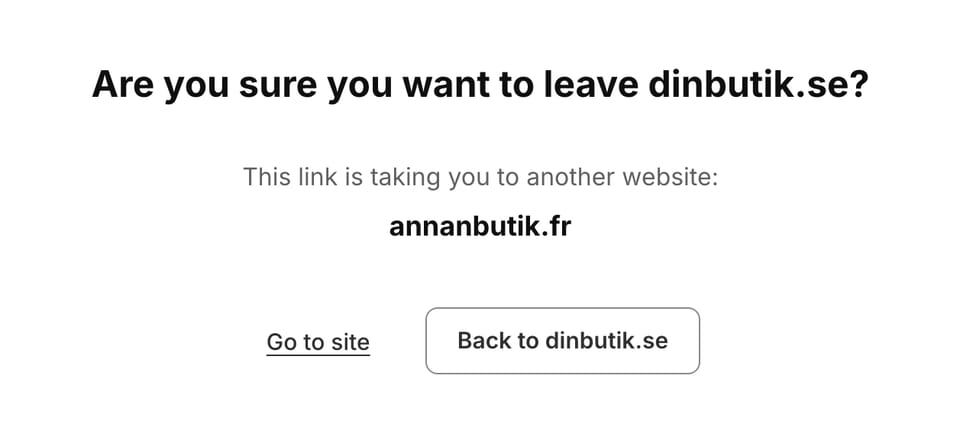
Shopify calls it the leave store confirmation. In the code it is exit_interstitial. There was no changelog entry. Most merchants found out when their market switcher stopped working.
The Help Center is direct about your options:
At this time, you can’t turn off the message or choose websites that skip it.
No setting, no trusted domain list, nothing in the theme. If you run one store on one domain you will barely notice. If you run a store per market, it sits in the middle of your country selector.
Why it fires on some links and not others
The script gets a per store config with an allowedHosts array. That array holds your domains from the Domains page, your .myshopify.com and account subdomains, shopify.com, shop.app, and a fixed social list that is the same on every store: access.line.me, api.whatsapp.com, facebook.com, instagram.com, lin.ee, pinterest.com, snapchat.com, tiktok.com, twitter.com, vimeo.com, wa.me, x.com, youtu.be, youtube.com.
The matcher walks up the domain tree:
return (hostname) => {
  let l = hostname;
  while (set[l] !== true) {
    const i = l.indexOf(".");
    if (i === -1) return false;
    l = l.slice(i + 1);   // drop the leftmost label, try again
  }
  return true;
};
So one entry for yourbrand.com quietly allows every *.yourbrand.com subdomain. Markets built on subdomains mostly link to each other without the dialog. Markets built on country domains hit it on every hop, because stripping labels off yourbrand.se never produces yourbrand.de.
I measured a 15 market group that mixes both. From the subdomain store, 6 of 15 destinations passed and 9 were interrupted; the 6 were all *.yourbrand.com, covered by the apex entry. From a country domain store, whose allowedHosts has no apex entry, all 15 were interrupted, including the subdomain ones. Same business, same switcher, opposite behaviour, and nothing in either theme explains it.
Adding the sibling domains to your Domains page is not a fix. A domain can only be connected to one store.
Why you cannot fix it in the theme
The script attaches a shadow root with mode: "closed", so no stylesheet and no script of yours reaches inside. Looking for the dialog the obvious way finds nothing:
document.querySelectorAll('dialog[open]').length        // 0, even while it is on screen
!!document.querySelector('shopify-exit-interstitial')   // this is the check that works
It also caches native methods before any theme code runs, so overriding window.location, patching Element.prototype.getAttribute or replacing Event.prototype.preventDefault does nothing. Those are the three things people try first.
It hooks anchor clicks, the Navigation API, window.open, location.assign and location.replace. It leaves back and forward alone, skips form submissions, and ignores mailto: and tel:.
The redirect
The check that decides whether to interrupt is this:
url.origin !== currentOriginSame-origin URLs are never inspected. So point the link at your own domain and let Shopify do the cross-domain hop server side:
- Under Content > Menus > URL redirects, add
/go/frtohttps://yourbrand.fr - Change the link from
https://yourbrand.frto/go/fr
A 301 from the server never fires a second navigate event, so there is nothing left to catch.
$ curl -sS -D - -o /dev/null https://yourbrand.se/go/fr
HTTP/2 301
location: https://yourbrand.fr/
In a real Chrome tab, running what a market switcher runs:
| Code | URL after | Interrupted |
|---|---|---|
location.href = 'https://yourbrand.fr/' | unchanged | yes |
location.href = '/go/fr' | https://yourbrand.fr/ | no |
The referrer survives, so analytics attribution is intact. No app, available on every plan.
Keeping the deep link
Redirects forward the query string but not extra path segments:
| Request | Result |
|---|---|
/go/fr?x=1 | 301 to https://yourbrand.fr/?x=1 |
/go/fr/products/foo | 404 |
Most switchers deep-link today, usually some version of data-url="{{ redirect_option.redirect_url }}{{ path }}", so switching market from a product page keeps you on that product. A bare /go/fr drops everyone on the homepage instead.
The path has to ride in the query string:
/go/yourbrand-fr?to=/products/foo
  → 301 → https://yourbrand.fr/?to=/products/foo
  → destination replaces it same-origin
On the destination store, early in the head:
const to = new URLSearchParams(location.search).get('to');
// "//evil.com" also starts with a slash, so reject the second one or you have
// built an open redirect on your own storefront.
if (to && to.startsWith('/') && !to.startsWith('//')) location.replace(to);
I also tried the formData exemption, submitting a cross-domain GET form. It was interrupted anyway. That route is closed.
Notes from testing
The script is only injected when the request looks like a browser navigation. A plain curl will not contain it, and you will wrongly conclude your store is unaffected. Send Sec-Fetch-Mode: navigate and Sec-Fetch-Dest: document with a normal user agent, then grep for shopify.exit_interstitial.
Headless browsers behind a sandbox or proxy block cross-origin top level navigation on their own, which looks identical to this. Click through to an unrelated domain from the same page as a control. If that is silently blocked too, your environment is the problem and the test tells you nothing.
Caveat
This is an anti-phishing control. It exists so a compromised store cannot bounce customers to a lookalike checkout. The redirect routes around it.
It is reasonable for linking between stores you own, which was never the target, and Shopify can close it whenever they like by inspecting the destination of same-origin redirects. The real fix is a trusted domain list, which is what merchants are asking for in the forums. Use this for your own markets, not for third party links.
Everything in this post is free to use. Would you rather I look at your store? Book a walkthrough and we do it together.
Get in touch